Integrating Python within MATLAB significantly enhances its functionality, enabling powerful workflows directly within the MATLAB environment. Currently, users set up Python in MATLAB through the command-line interface. This method involves complex tasks such as manually specifying Python installation paths, managing virtual environments, and configuring module paths. These usability challenges result in a lot of support calls, with around 13% specifically addressing setup-related issues. Additionally, MATLAB currently falls short compared to competitor tools like Visual Studio and PyCharm, which offer more intuitive and seamless interfaces for similar Python integration tasks.
The challenge is to simplify and streamline the Python setup experience within MATLAB, reducing the high barrier of entry for users. This includes designing an intuitive user interface that minimizes manual and error-prone steps, facilitates straightforward management of Python virtual environments and modules, and aligns MATLAB's Python integration experience more closely with industry standards set by competitor IDEs. Improving this user experience will not only decrease technical support inquiries but also strengthen MATLAB’s position in the competitive landscape.
ENTERPRISE UX · SOFTWARE
Designing a Python integration panel to reduce reliance on complex CLI-based setup with a streamlined GUI, making environment management inside MATLAB more discoverable and developer-friendly.
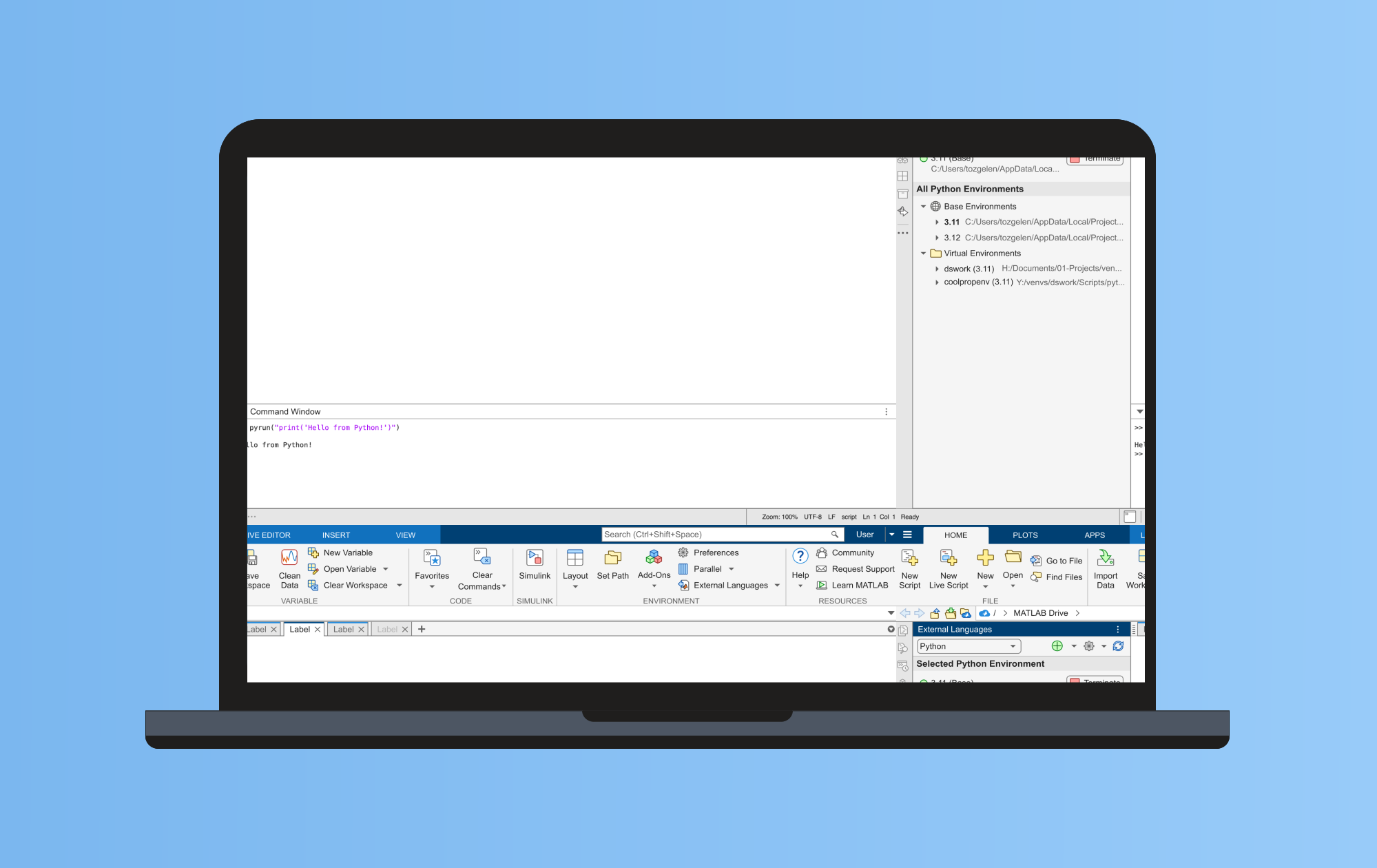
01 — Overview
The Problem
Python integration in MATLAB relied heavily on command-line setup and external configuration, creating a fragmented workflow that was difficult to use and error-prone especially for users unfamiliar with CLI-based tooling.
My Approach
The work involved mapping developer workflows, collaborating closely with engineering and research to understand users & system constraints, and designing a GUI that balances flexibility with clarity for both advanced and new Python users.
The Outcome
Delivered a GUI for configuring and managing Python environments within MATLAB, reducing reliance on external setup steps and improving discoverability of Python integration features.
02 — The Problem
Python integration in MATLAB depended heavily on command-line configuration and external environment setup. While powerful, the workflow required users to remember commands to manage interpreters, dependencies and system paths creating friction and increasing the likelihood of configuration errors especially for users new to MATLAB–Python development.
Business Problem
Python setup challenges were a recurring source of friction for MATLAB users and internal support teams. The reliance on CLI-based workflows made key features difficult to discover and increased call volume from users.
User Problem
Developers needed a clearer way to understand and manage their Python environments without leaving MATLAB. Existing workflows required switching contexts between documentation, terminal commands, and settings, increasing cognitive load and slowing down experimentation.
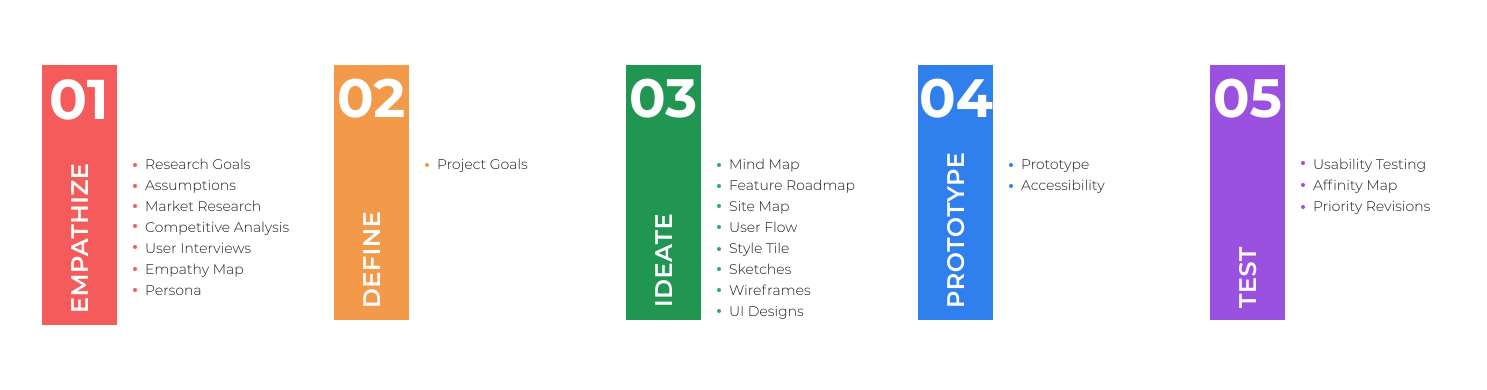
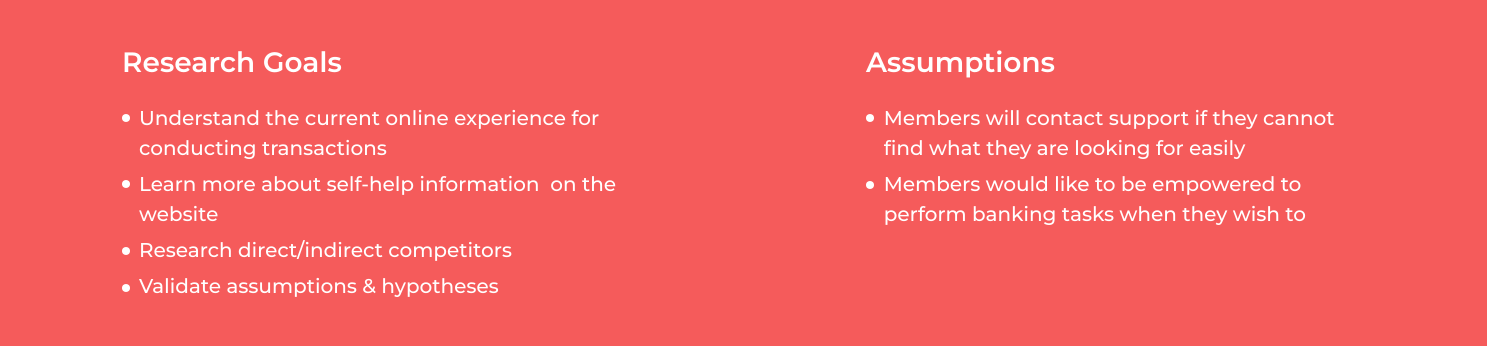
Started planning for research by outlining research goals, assumptions, methodologies, and timeline. I identified which customers should I target initially, what the best research methods are, and what the key areas of inquiry are. It helped me structure my approach to understand the opportunities in this area.
We conducted interviews with stakeholders to understand the problem space at hand and to uncover their pain points. After conducting the interviews, we analyzed the data, insights & recommendations provided by different business areas to identify requirements.
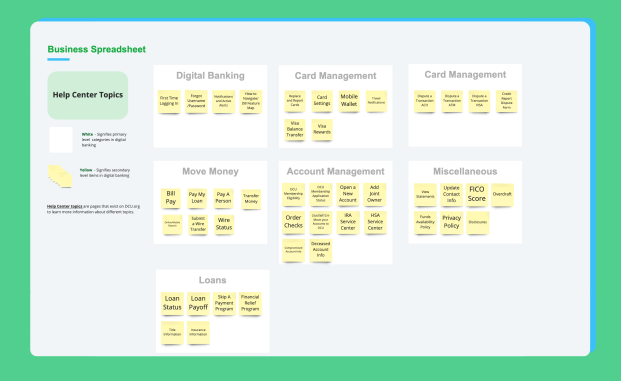
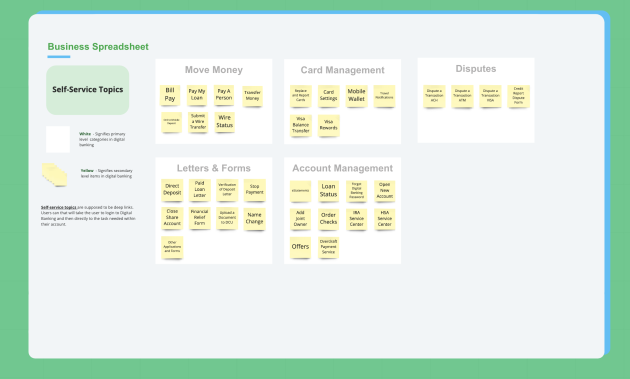
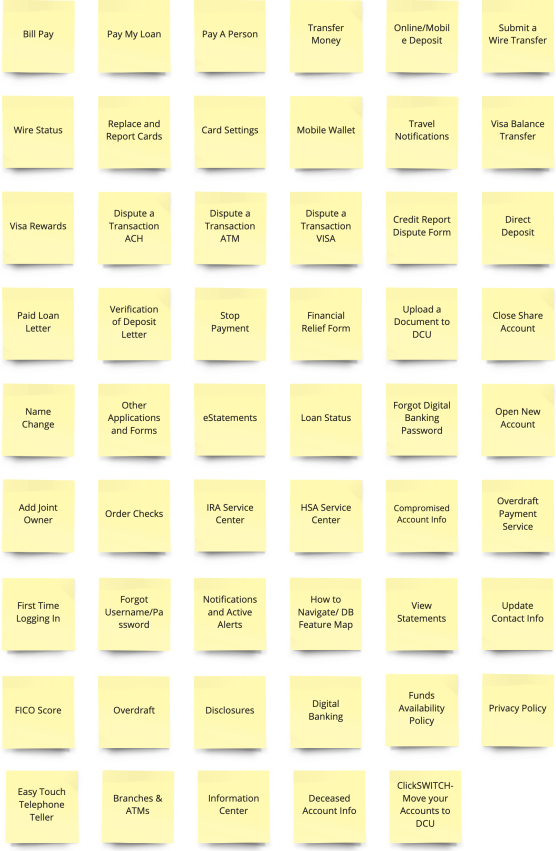
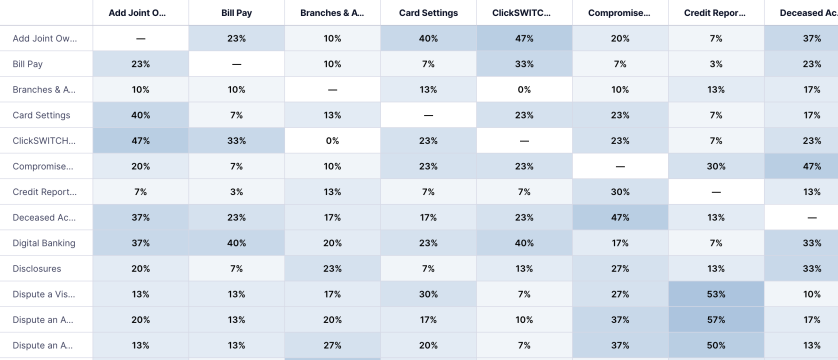
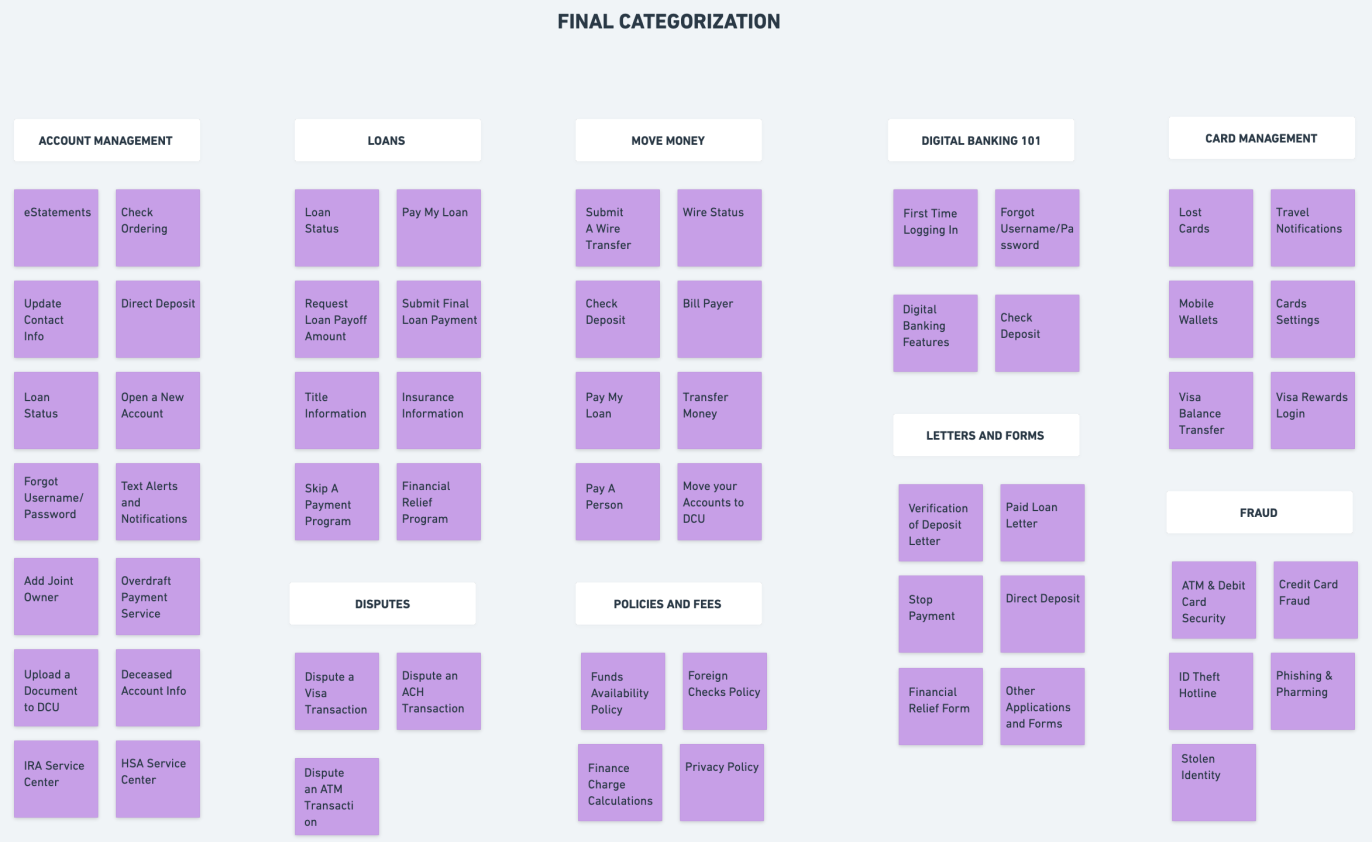
Since this would deal with the Information Architecture, so I wanted to perform a card sort to discover how people understand and categorize information so that I can organize and label content in a way that makes the most sense to members. I ran an open card sorting exercise with 30 participants online on UserZoom. Participants were asked to sort 53 cards into groups of their choosing and then were asked to name each group according to their understanding.I synthesized the findings to look for common patterns and also looked at how participants classified the information under different topics. Card sorting also helped to capture the different verbiage used by participants to group items.
.svg)
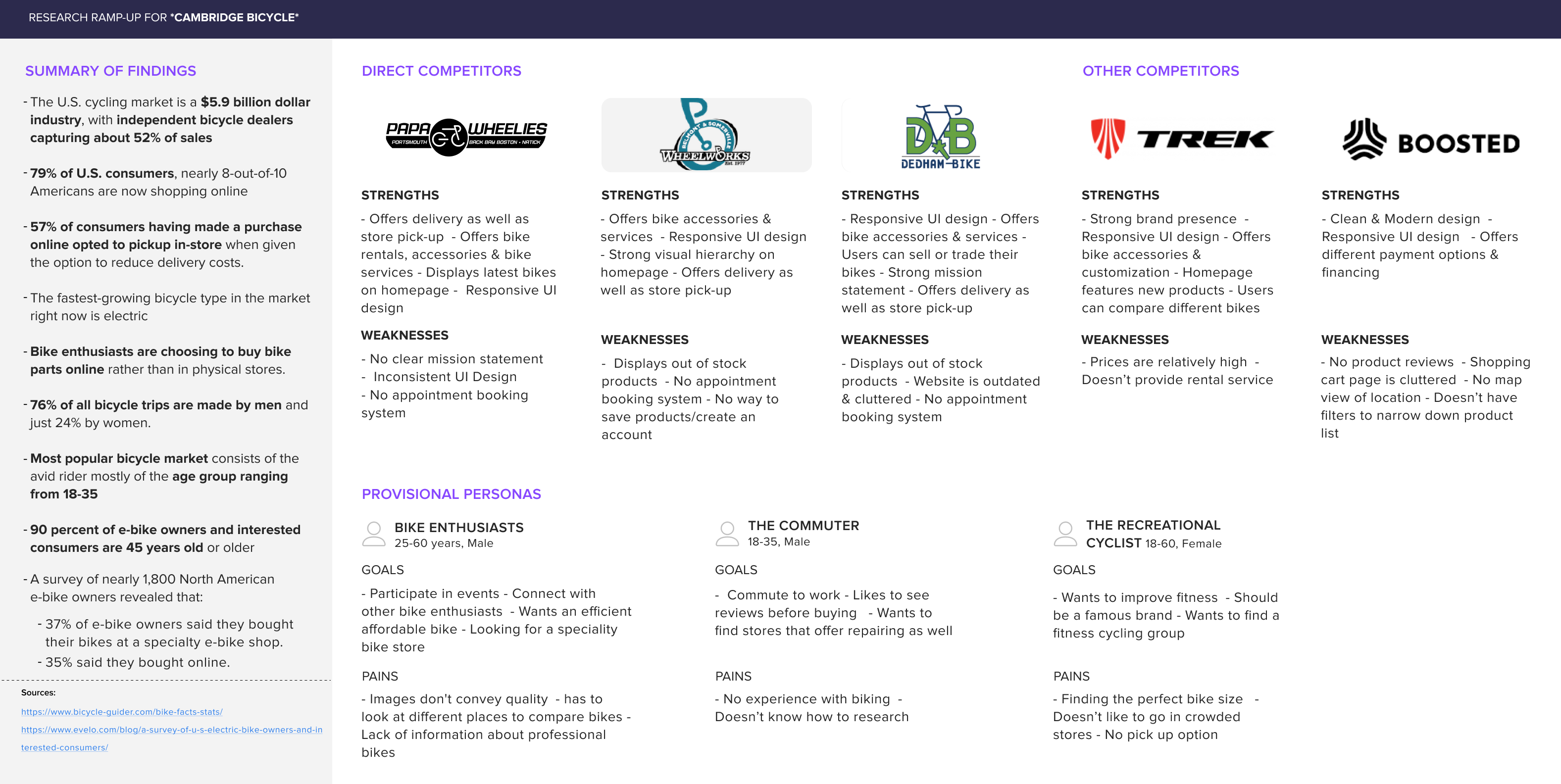
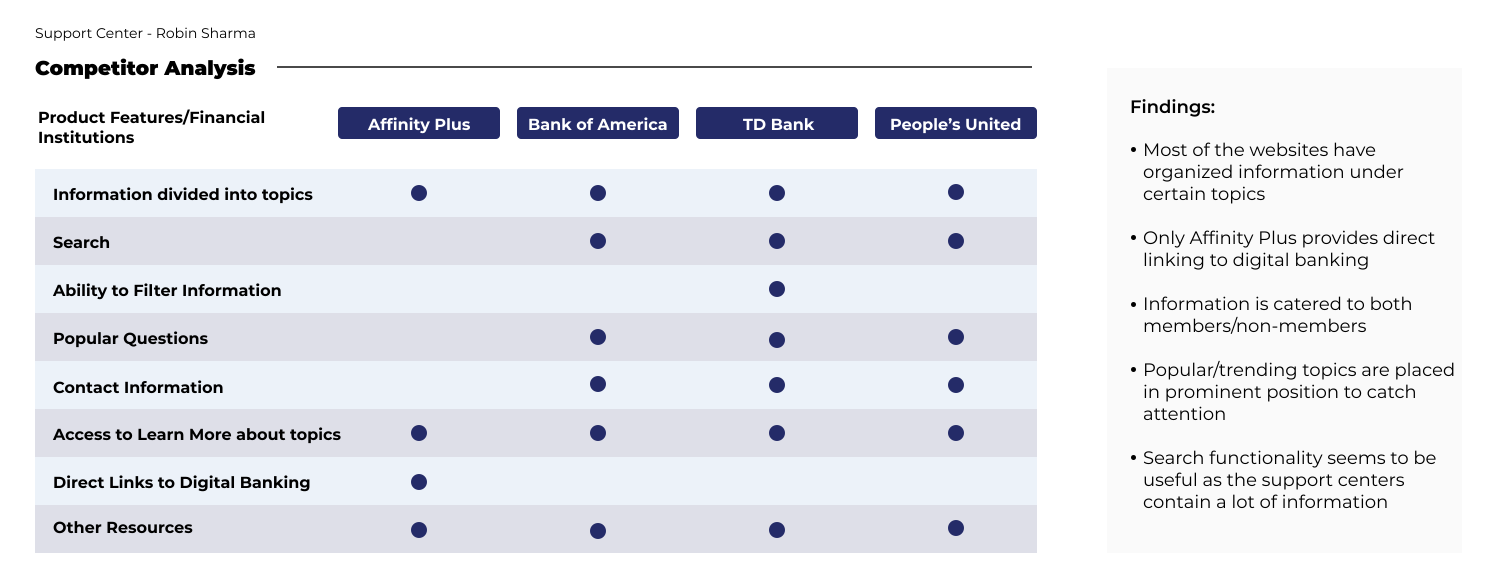
I performed competitive analysis on direct and indirect competitors to to understand what’s currently available to customers as well as identify their strengths & weaknesses
I synthesized the research by analyzing the data from business, results from competitive analysis & card sorting and to understand the pain points, frustrations, feelings and needs of users.I started by mapping out the user responses on post-it notes to gain a deep understanding of their experiences. Then, I looked for common patterns and created a cluster to capture the categorization.
03 — Research
This research phase focused on defining key user segments, mapping their configuration workflows, identifying systemic friction points, and translating those findings into actionable product requirements.
Stakeholder Interviews
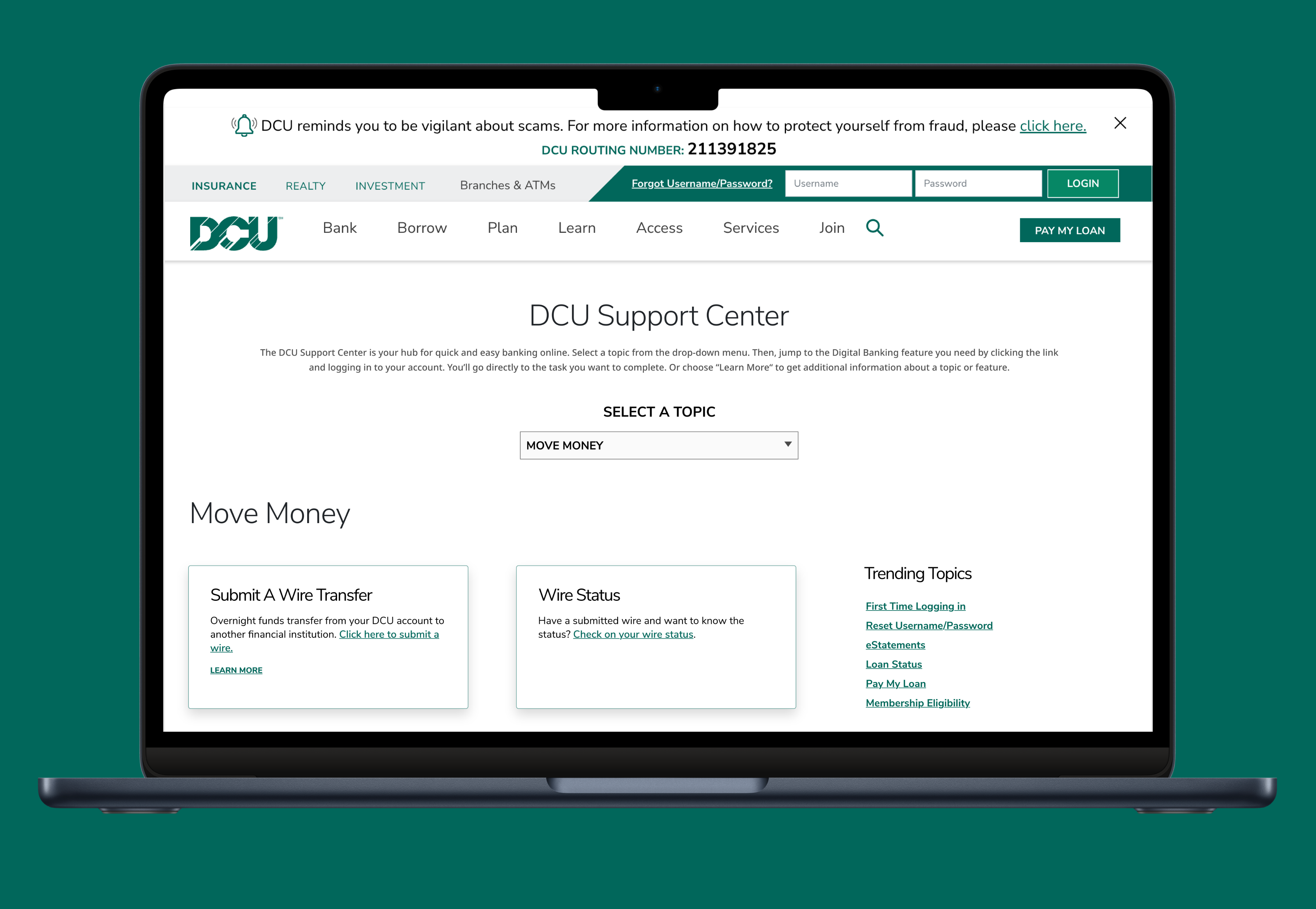
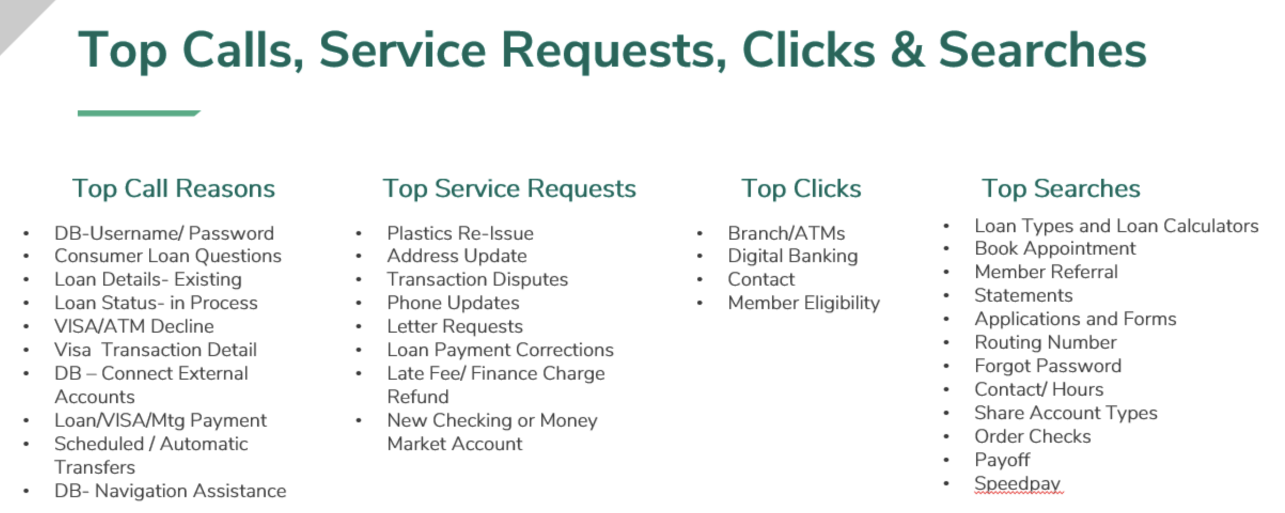
Interviewed DCU business stakeholders across multiple departments to understand the problem areas, top inbound call drivers, and opportunities. Transfers and mobile banking were identified as dominant call categories.
Card Sorting — 30 Participants
30 DCU members sorted 53 cards in an open card sort on UserZoom. 9 categories emerged from the results — including Account Management, Payments & Transfers, and Card Management — which directly informed the navigation structure.
Competitive Analysis — 4 Competitors
Analysed Affinity Plus, Bank of America, TD Bank, and People's United. All four organised information under topics, and most included search and popular questions in a prominent position to help members find answers quickly.
Customer Research
Working closely with our engineering and support teams, we conducted detailed discussions to clearly define and understand user roles, and goals. These discussions helped us identify two primary user profiles for this project:

Understanding the Current Workflow
To gain deeper insights into how users currently set up their Python environments within MATLAB, I collaborated closely with the development team and reviewed technical support cases. We examined user scenarios, common pain points, and support interactions to map out existing workflows clearly. The process involved:
1) Meeting with developers to discuss technical constraints.
2) Analyzing user-reported issues from documented support cases
3) Reviewing MATLAB Answers forums and existing documentation
Based on these discussions and research, we identified several typical user workflows. These workflows highlight manual, repetitive, and external setup steps users must currently undertake, leading to frequent frustrations and usability issues.
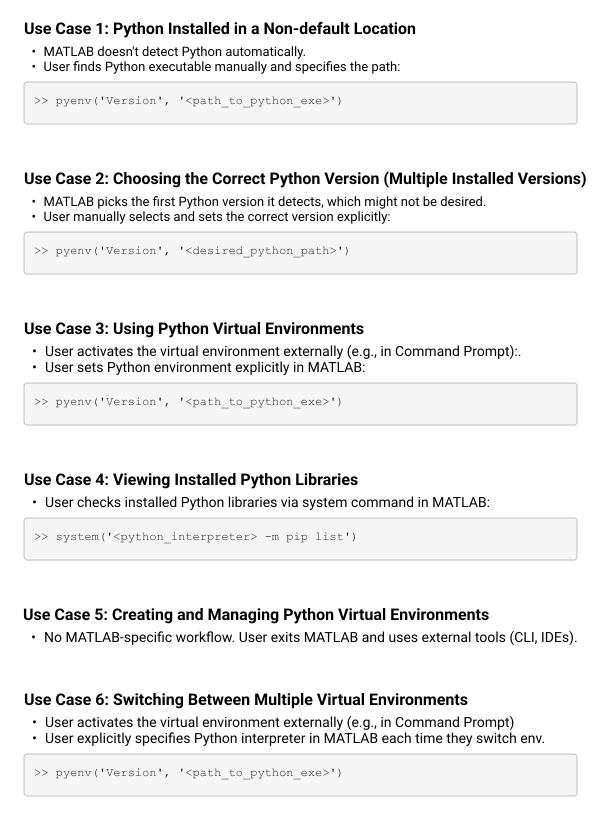
PYTHON INTERPRETER STATE MODEL
We also mapped the different states of the interpreter to understand how state transitions affected environment switching. Once a Python interpreter is loaded in-process, it cannot be changed without restarting MATLAB. In out-of-process mode, the interpreter can be terminated and reloaded. These constraints fundamentally shaped the interaction design.
.svg)
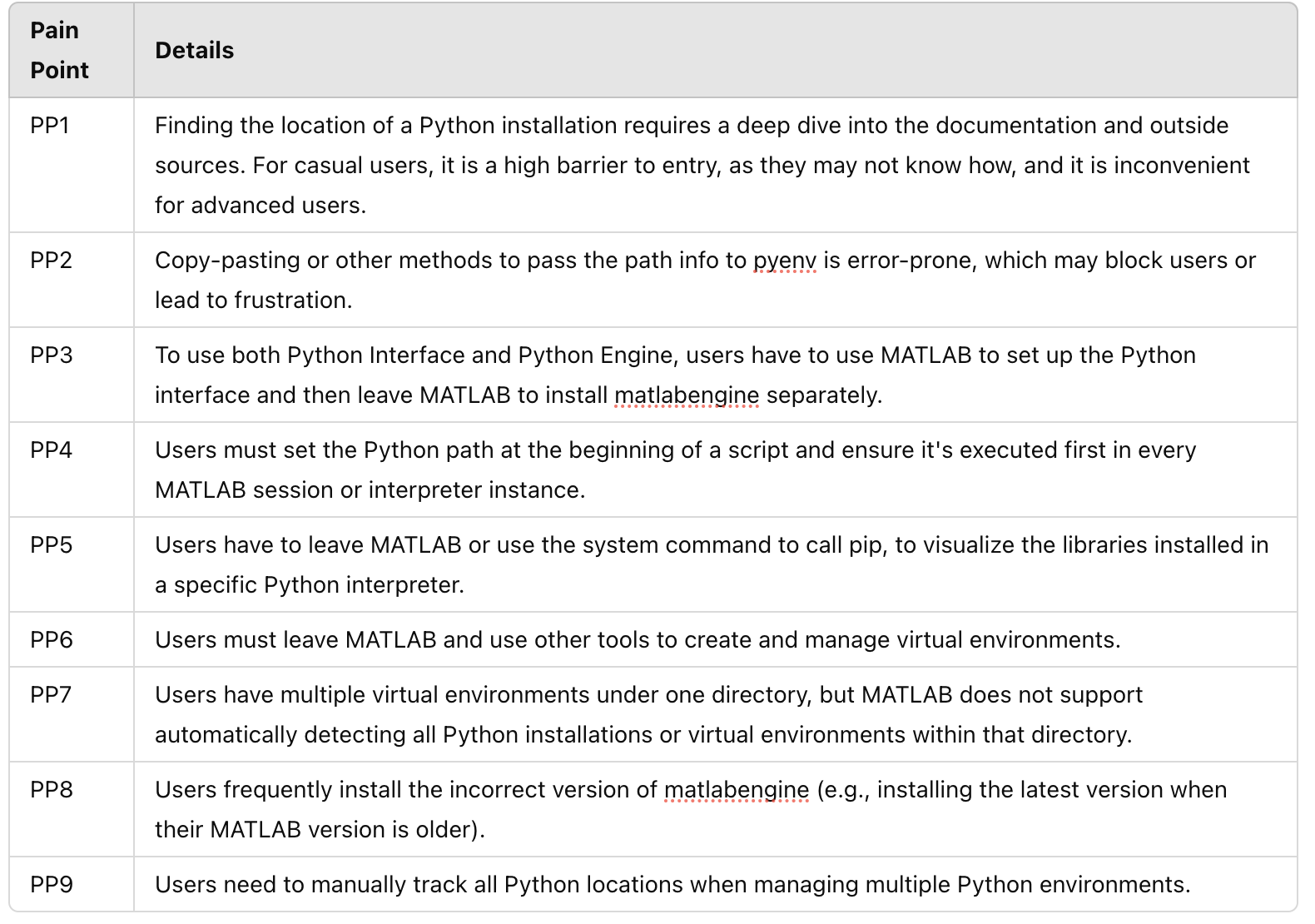
Pain Points
We identified several significant usability pain points in the existing Python setup experience.
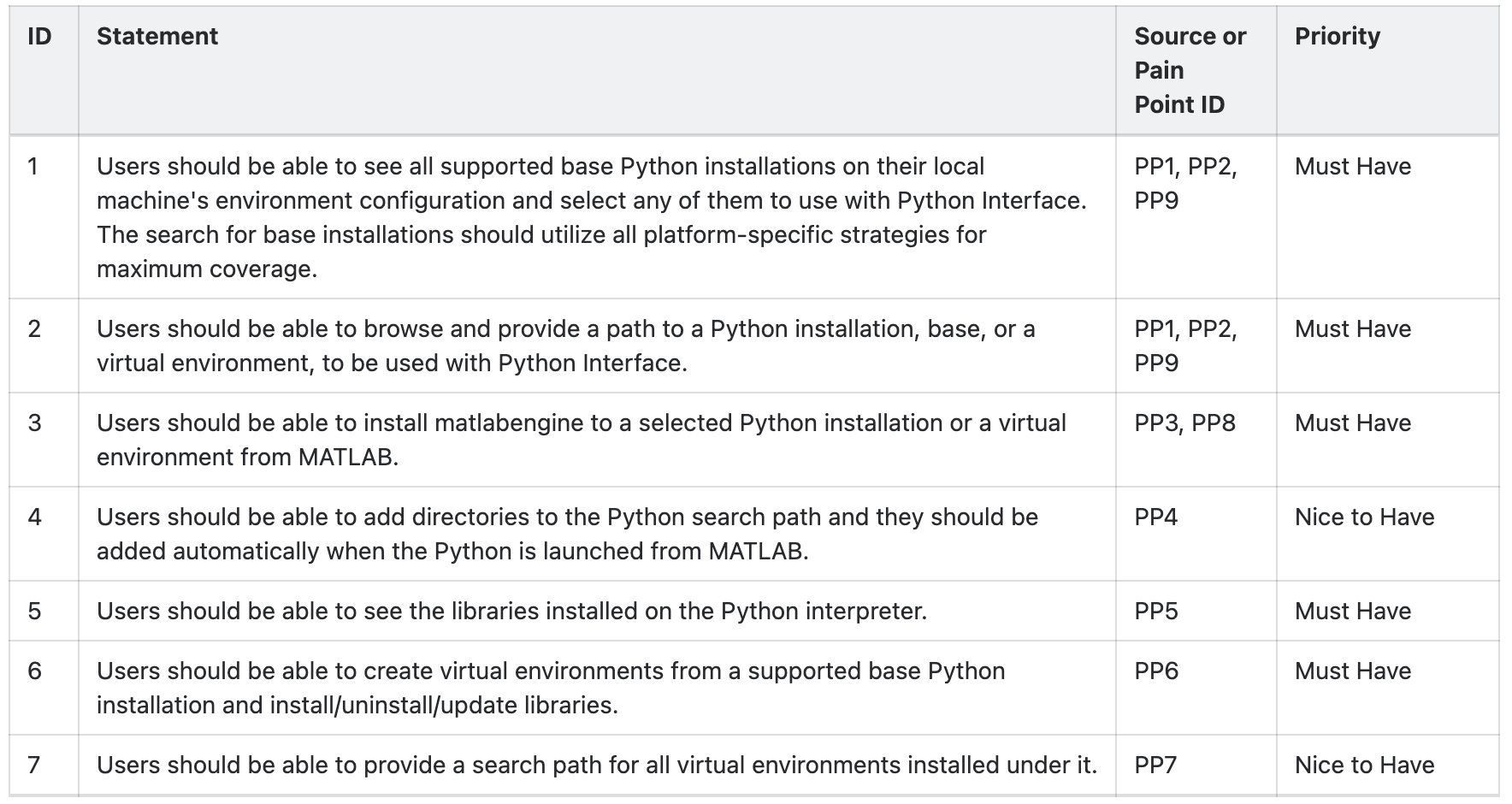
Requirements
Following our research and pain point analysis, we worked with development team to define clear and actionable requirements for this functionality.
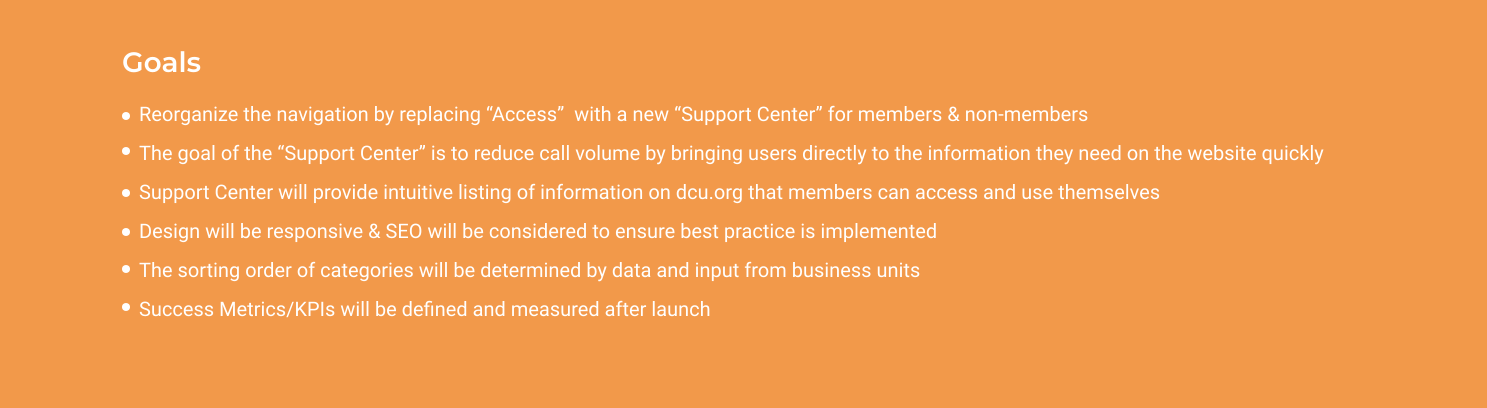
After synthesizing research findings and uncovering needs, next step was to define project goals that allowed me to look at a fresh perspective on the problem from the user’s point of view. I combined business goals from the initial Design Brief and user goals from my Empathy Map, taking into account technical considerations, to visualize how to prioritize features to design for the minimum viable product.
04 — Design
Before jumping to wireframing, I first wanted to benchmark industry-leading IDEs. I primarily analyzed VS Code and PyCharm, but I also explored Visual Studio's Solution Explorer to understand additional UI patterns for managing environments and dependencies. The goal was to identify best practices and design opportunities to enhance MATLAB’s Python setup experience.
This benchmarking exercise provided valuable insights into UI patterns that simplify Python environment setup, helping to inform potential design improvements for MATLAB.
Finding 1 → Design Decision
Competitive analysis showed that automatic Python detection significantly reduces setup friction and prevents configuration errors.→ The system should automatically detect and categorize available Python environments, minimizing manual path entry while still supporting advanced configuration
Finding 2 → Design Decision
Active interpreter state is visible and persistent → The active Python environment and its execution state must be clearly surfaced to users, reducing ambiguity about which interpreter is in use
Finding 3 → Design Decision
Across PyCharm, VS Code, and Visual Studio, Python interpreter selection is accessible without requiring users to leave their primary coding environment.→ Interpreter management should be discoverable within core MATLAB workflows rather than requiring deep navigation
.svg)
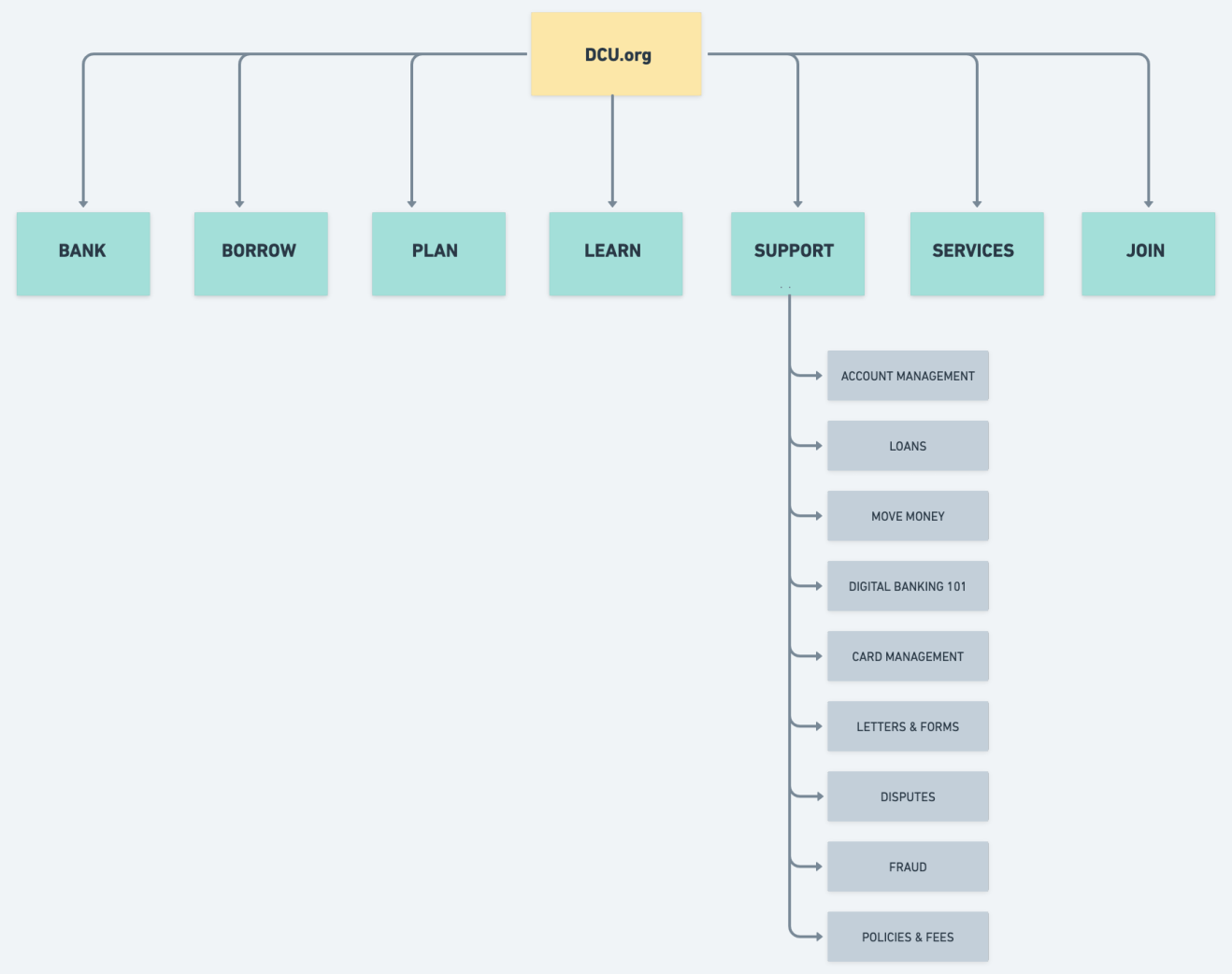
Building from the product goals, feature roadmap, and card sorting results, I created a sitemap that included proposed pages to help plan the structure of the website. By visualizing the information architecture and identifying key relationships between screens, we can better understand the flows and interactions throughout the site.
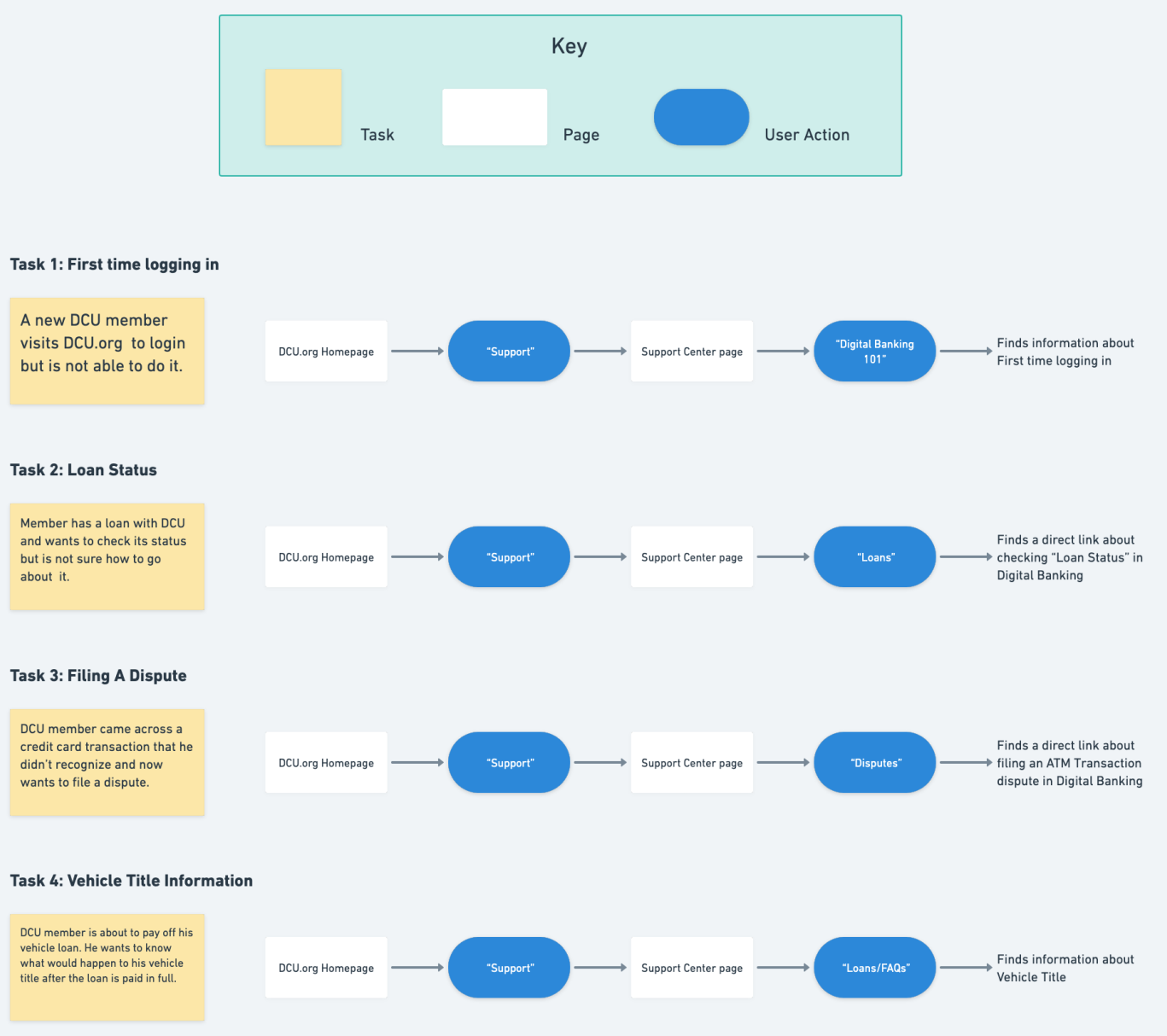
Creating a task flow helped to identify which pages were required within the customer’s process and forced me to think through the customer experience in more detail. Also, once I have the main flow ready, I can use use these tasks to test it out with users. I designed the task flow by breaking down the necessary steps for a user to get from the landing page to the order confirmation page. I was able to outline the screens that need to be created through a task flow exercise.
05 — Design Process
With research complete, the focus shifted to translating insights into structure and interaction.
Concept A — Search-first
A minimalist entry point centered on a large search bar. Browse was secondary. Hypothesis: members who know what they need will resolve their issue faster if search is the primary action. Risk: members without the right vocabulary would still struggle.
Concept B — Browse-first
A visual topic card grid with 9 category tiles plus a secondary search bar. Hypothesis: visual scanning reduces cognitive load for members who can't formulate a search term. This directly addressed the card sorting insight about task-based mental models.
I brought both concepts into Figma as lo-fi wireframes and ran them through a round of informal critique with the product team before building out hi-fi prototypes for A/B testing.
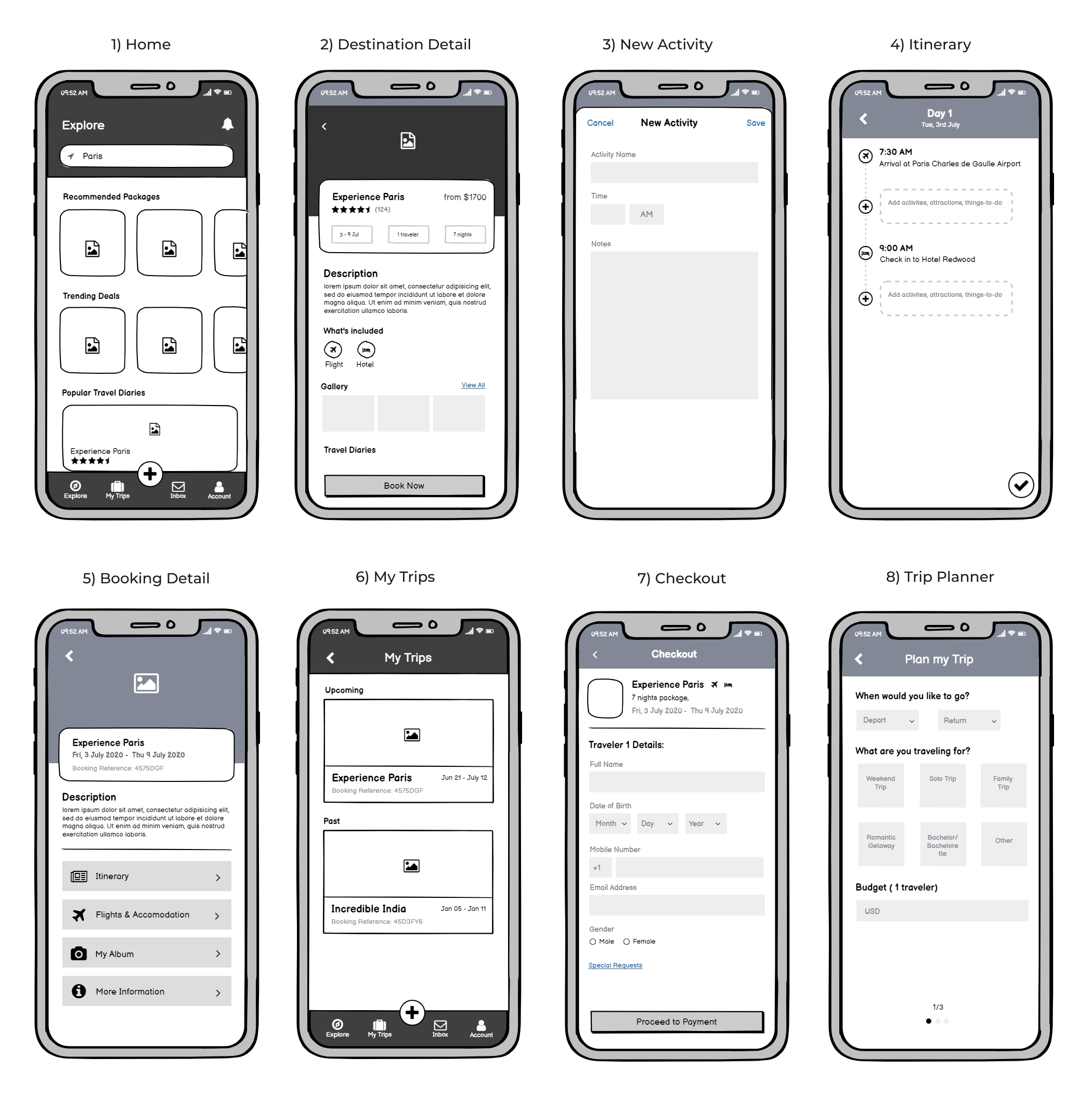
Lo-fi Wireframes
I created multiple lo-fi design concepts to explore various design possibilities and assess the optimal placement of this feature within the MATLAB UI.
.svg)
user study
To determine where users expect to find the feature in MATLAB, we conducted a survey-based preference study. We identified key areas where this functionality could be placed but wanted to validate our assumptions by gathering user insights.
Based on these insights, having the feature accessible both within the Environment section and in the Side Panel ensures better visibility and usability for all users.
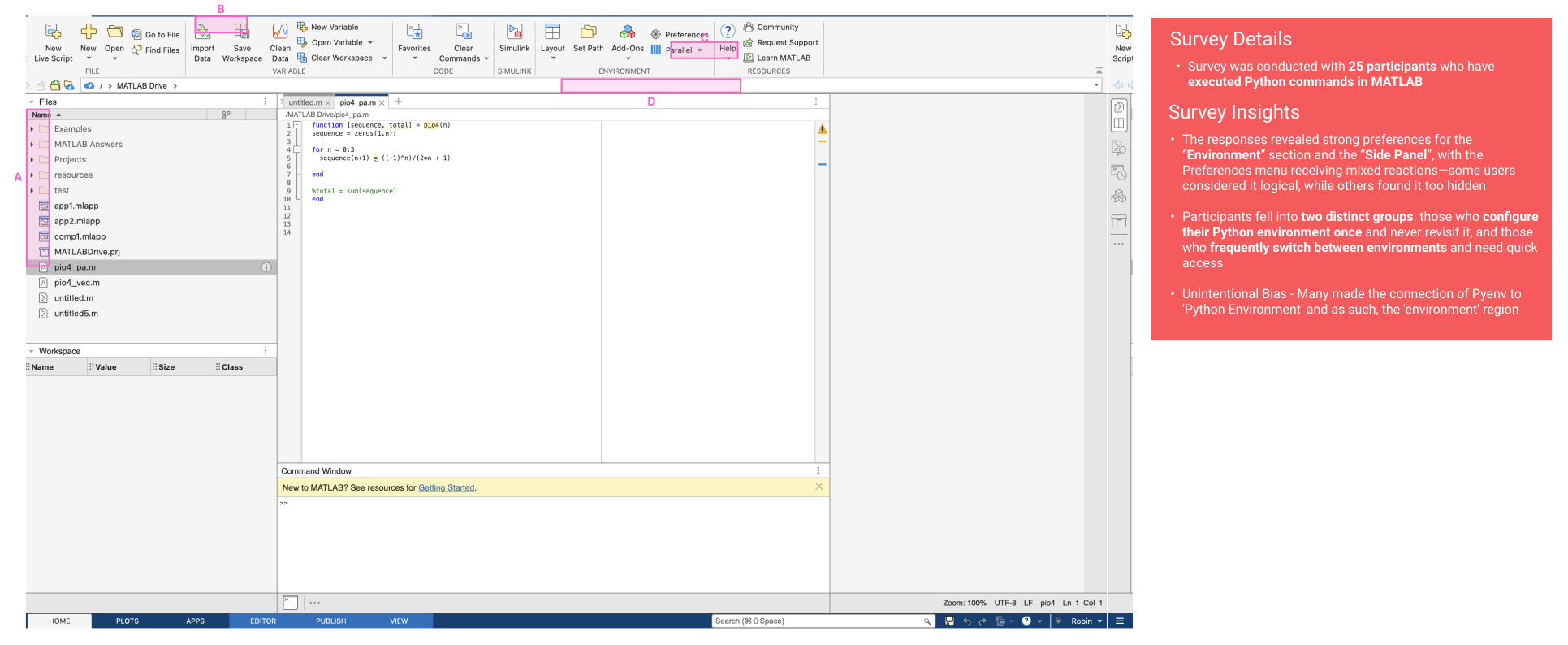
Tradeoffs: Placement Strategy and Platform Constraints
The usability study surfaced two valid mental models:
1) Some casual users expected interpreter configuration under the Environment section in the toolstrip, associating it with setup and preferences.
2) Other users particularly those switching between projects preferred a side panel for persistent, quick access aligned with active workflows.
However, placement could not be evaluated based on user preference alone. At the time, the MATLAB Desktop team was undergoing a major redesign of the toolstrip. New features were not being introduced in that region to minimize scope expansion and reduce risk during the transition. This introduced a strategic constraint beyond pure UX considerations.
Final Decision
Given the toolstrip expansion constraint and the need to support frequent interpreter switching, we chose to implement a dedicated side panel. This approach allowed us to:
1) Move forward independently of the desktop redesign timeline
2) Support both stable (configure-once) and frequent-switch workflows
3) Establish a scalable foundation for managing additional external languages in the future
Hi-fi wireframes
With this direction finalized, I iterated further on the designs, incorporating user feedback and stakeholder input to refine the layout, streamline workflows, and ensure the feature seamlessly integrates into MATLAB’s ecosystem while aligning with key user needs identified in our research.
.svg)
usability testing
We conducted a usability study to assess how effectively users could discover, configure, and manage Python environments within MATLAB using the new design. The study focused on evaluating ease of execution, and confidence levels when performing key Python-related tasks with the UI. Key objectives were as follows:
1) Evaluate User Comfort in Selecting a Python Installation: Can users confidently choose a Python interpreter from their local machine to use with MATLAB?
2) Assess Ability to Configure Unlisted Python Installations: How easily can users locate and set up an interpreter that is not detected by default?
3) Test Library Management Workflows: Can users successfully add, remove, and update libraries—including matlab.engine in their selected environments?
4) Evaluate Virtual Environment Setup: How comfortable are users in creating and setting up a virtual environment for use with MATLAB?
5) Measure User Confidence in Modifying the Python Environment: Can users effectively change Python versions, execution modes, and adjust the Python search path after the interpreter has already been loaded?
Tasks & User Scenarios
These tasks reflected real-world scenarios users encounter when integrating Python with MATLAB, allowing us to gather valuable insights into usability challenges and areas for improvement.
1) Selecting and switching between different Python versions to ensure users could configure their preferred interpreter.
2) Setting up an interpreter that is not listed by default, testing users' ability to manually configure a missing Python installation.
3) Managing virtual environments, including creating new environments, adding existing ones, and switching between them.
4) Installing and updating libraries, such as matlab.engine, to evaluate how easily users could modify their Python setup.
4) Configuring the Python search path for external modules, assessing users' comfort in making adjustments when encountering missing dependencies.
.svg)
design revisions
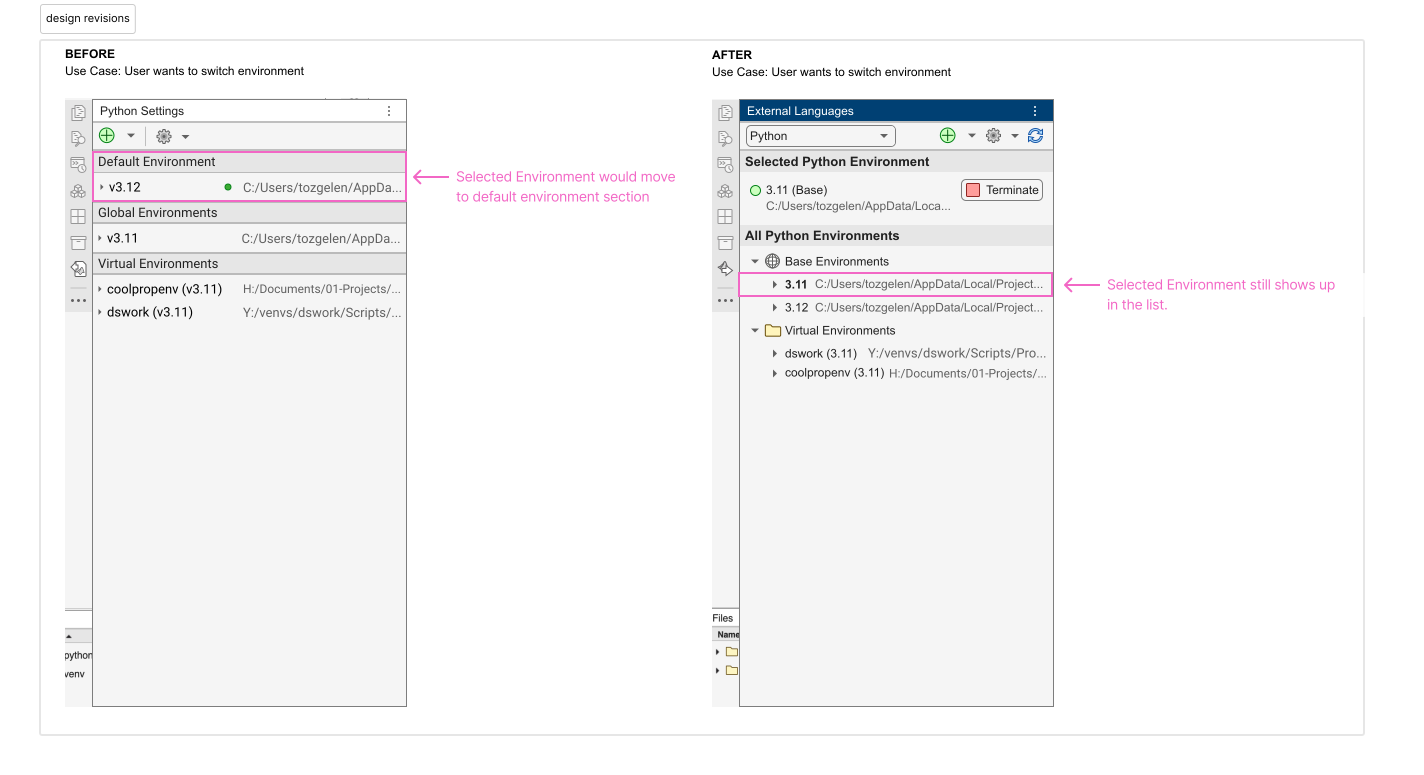
Usability testing surfaced several interaction gaps that directly shaped the next iteration of the Python Environment panel. The revisions focused on improving clarity, reducing unintended behavior, and making system status easier to understand at a glance.
1) Clarified environment hierarchy and behavior
Participants were confused when changing the default environment caused the list order to shift. The design was updated to preserve a stable environment order and introduce clearer visual indicators for the active default. This reduced cognitive load and made comparisons between environments easier.
2) Stronger differentiation between environment types
Users struggled to distinguish virtual environments from global installations. Updated visual treatments — including labels, grouping, and status cues — were introduced to make environment scope immediately recognizable without relying on technical knowledge.
3) Improved library management visibility
Testing showed uncertainty around whether libraries were installed or simply available. The interface was refined to separate installed packages from installable options and provide clearer state feedback during actions.
4) Enhanced status indicators and guidance
Although users noticed the status icon, many were unsure what it meant. Tooltips and supporting microcopy were added to explain environment state, helping users understand issues without leaving the panel.
5) Navigation and entry-point clarity
Feedback revealed different expectations around where Python configuration should live. The panel’s entry points and labeling were refined to align with mental models observed during testing, making the feature easier to locate within MATLAB.
%20(1).svg)
Icon work
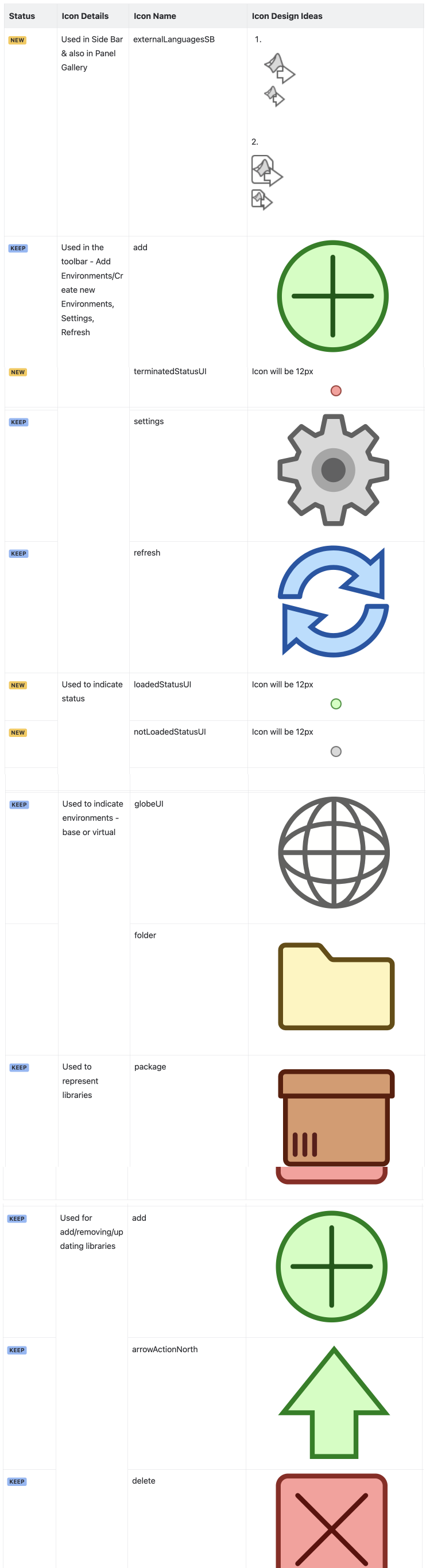
To ensure visual consistency and efficient UI design, I reviewed the existing icon library to identify reusable icons for the Python Environment Management panel.
Wherever possible, I leveraged pre-existing icons for actions like adding environments, refreshing lists, and managing libraries, reducing the need for custom assets while maintaining familiarity for users.
In addition to reusing standard icons, I designed new icons to address specific needs within the panel. One of the key additions was an icon for "External Languages," which will serve as the panel name and entry point. This icon was developed to visually represent MATLAB’s integration with external programming languages like Python, making it instantly recognizable to users
Once the hi-fi wireframes received final approval, they were passed on to the development team for implementation. After the site went live, we leveraged analytics to monitor and analyze user behavior.
06 — Outcomes
12%
Reduction in support call volume
67%
Self-service success rate (from 41%)
+34%
Increase in support page engagement
4.2/5
Member satisfaction score
What I’d do differently
Research started too late. Card sorting and the competitive audit happened after the initial brief, which meant correcting assumptions mid-project. Next time I’d advocate for a dedicated research sprint before any scoping. I also underestimated content migration effort — involving the content team earlier in the define phase would have surfaced that dependency before it became a schedule constraint.
What I’d repeat
The A/B test was the right call. It removed opinion from what could have been a difficult stakeholder conversation, and it gave the whole team shared confidence going into dev. Whenever two fundamentally different navigation models are in play, I’ll use this approach again.
Python Environment panel replaced a fragmented, CLI-driven workflow with a centralized GUI inside MATLAB, reducing configuration friction and making Python setup more accessible to a broader range of users. By surfacing interpreter detection, environment management, and guided setup directly in the interface, the design helped streamline onboarding and reduce dependency on external documentation or terminal commands.
- Reduced complexity in configuring Python environments within MATLAB workflows
- Enabled faster environment switching and clearer visibility into active configurations
- Supported a more scalable foundation for future environment and package management feature
What I’d do differently
Research started too late. Card sorting and the competitive audit happened after the initial brief, which meant correcting assumptions mid-project. Next time I’d advocate for a dedicated research sprint before any scoping. I also underestimated how long content migration would take — involving the content team earlier in the define phase would have surfaced that dependency before it became a schedule constraint.
What I’d repeat
The A/B test was the right call. It removed opinion from what could have been a difficult stakeholder conversation, and it gave the whole team shared confidence going into dev. Whenever two fundamentally different navigation models are in play, letting members decide through structured testing is always the right move.
What I’d do differently
Earlier validation of edge cases such as conflicting environments, missing dependencies, or legacy configurations — would have helped anticipate constraints sooner and reduce iteration cycles during implementation.
What I’d repeat
Grounding the design in competitive benchmarking and real developer workflows ensured the UI balanced power with clarity. Iterating closely with engineering and validating decisions against existing IDE patterns helped create a solution that felt familiar to developers while remaining consistent with MATLAB’s design standards.